Please make sure that your Antivirus (external or Windows Defender), as well as your Firewall, are all disabled before using the cheat.
Follow this video-guide to know HOW TO
!
Use Fullscreen Windowed or Borderless Mode Switch your game to Fullscreen Windowed or Borderless before loading the menu.
Disable Anti-Lag or Upscaling Features In both your game settings and GPU control panel, disable any Anti-Lag or Upscaling features for better performance.
You need to set your Computer time zone to +8 utc Beijing For this menu.
Extract the .rar file and move the newly unzipped folder to your Desktop. Alternatively, you can create a new folder on the Desktop and drag all the extracted files from the .rar archive into that folder.
2
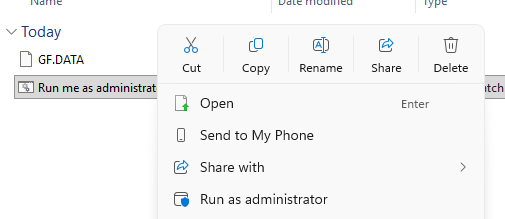
Right-click the bat file executable and select Run as Administrator.
3
Enter the key you received at purchase.
4
Start the game and wait until you reach the Main Menu.
5
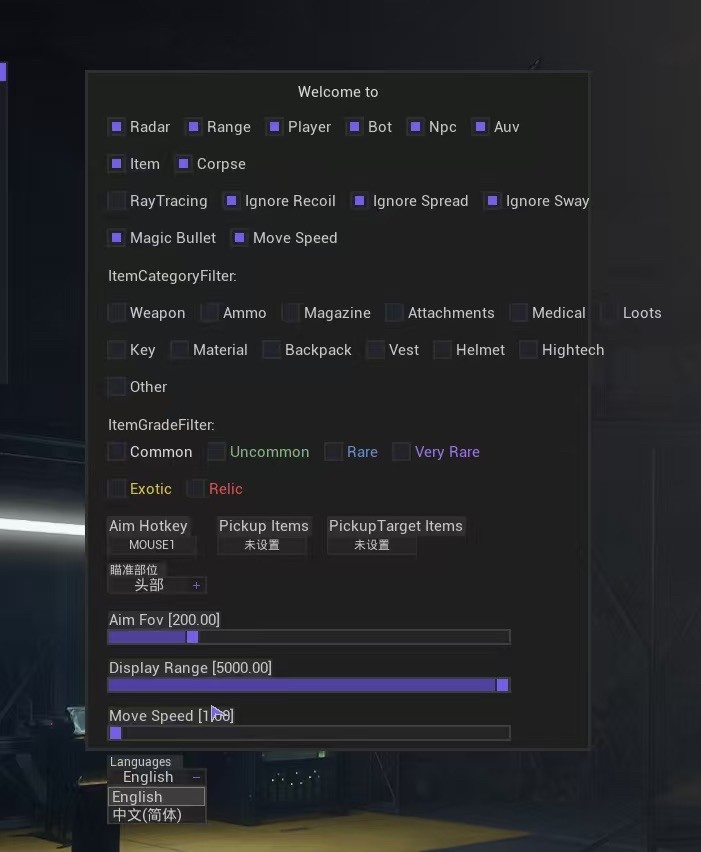
If everything is working correctly, you can show or hide the menu by pressing the HOME key. Unload menu key: END
To put menu in English there is a button in middle called English. Click that
Frequently Asked Questions
Why I can't play the game in Fullscreen mode?
Gamepron works as an external cheat, meaning that you must run the game in Borderless mode.
What game resolution should I use?
For this Testing we will be running the game in Borderless mode and 1920×1080 resolution.
The cheat is not loading. How do I fix it?
When you open the loader, a small message will be shown, if you close this window, nothing else will work. This window must remain open for few seconds. Also, if you disable the crosshair/esp options given next, the cheat will be disabled ingame.
I am getting "failed to loader the driver" error. How do I fix it?
Please read and follow this article before using any cheat!